Golisimo Casino Login in Canada
Accessing a Golisimo casino account provides immediate entry to a platform with over 10,550+ games and extensive sports betting markets. This page outlines the secure logging process, password recovery steps, and mobile access options. It also details the dashboard features available post-login, such as real-time bonus tracking, loyalty "Energy" balances and many others.
Log in at Golisimo Casino
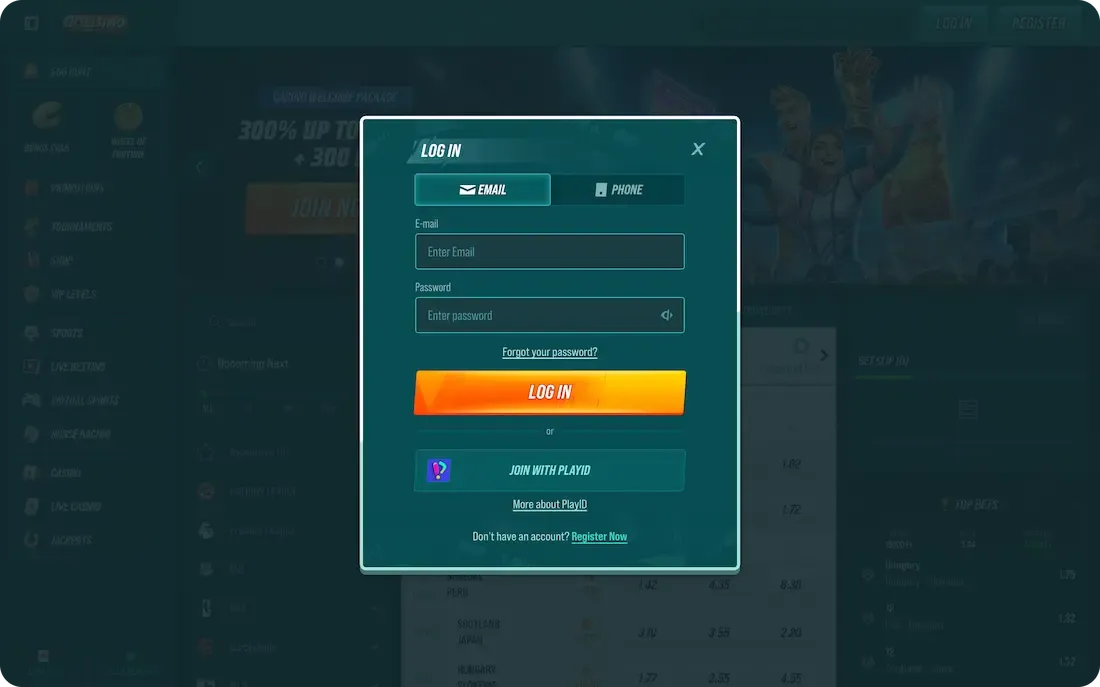
Upon completing the registration process, Golisimo Casino usually initiates an automatic login, granting immediate access to the dashboard. For subsequent visits, the betting platform provides several secure entry methods to accommodate different user preferences and devices. Whether using a desktop or a mobile browser, players can choose the most convenient way to re-authenticate their identity. Among them are:
- Email login: This traditional login method uses the registered email address and password. It is highly secure and ideal for users who manage multiple accounts via desktop.
- Login with telephone number: This option allows for quick access using a mobile number and a unique code. It is especially convenient for players using mobile devices.
Logging in to Golisimo via Email
To log in at Golisimo Casino using a registered email address, follow these straightforward steps:
- Access the Golisimo website through any standard browser on your desktop or mobile device.
- Click the "Login" button located at the top right of the homepage.
- Type the registered email address into the designated username field accurately.
- Provide the unique password created during the initial account registration process.
- Press the "Log In" button to verify credentials and enter the account.
- View the personalized dashboard to manage funds or continue playing games.
Logging in with Your Phone Number
To log in to Golisimo using a mobile phone number, players should follow this sequence for quick access to their account features:
- Open the Golisimo website through a preferred mobile or desktop browser.
- Select the "Login" button located at the top of the screen.
- Toggle the login option from email to the telephone number tab.
- Choose the correct country code from the provided drop-down menu.
- Enter the registered mobile phone number into the required field.
- Enter the account password, then press the final login button.
Golisimo Casino Mobile Login
The mobile login experience at Golisimo Casino is identical to the desktop version, ensuring a seamless transition between devices. Since the gambling website is fully optimized for mobile browsers, no app download is required. Simply open the site on a smartphone or tablet, tap the login button, and enter existing credentials to access the full library of 10,550+ games instantly.
How to Renew Access at Golisimo?
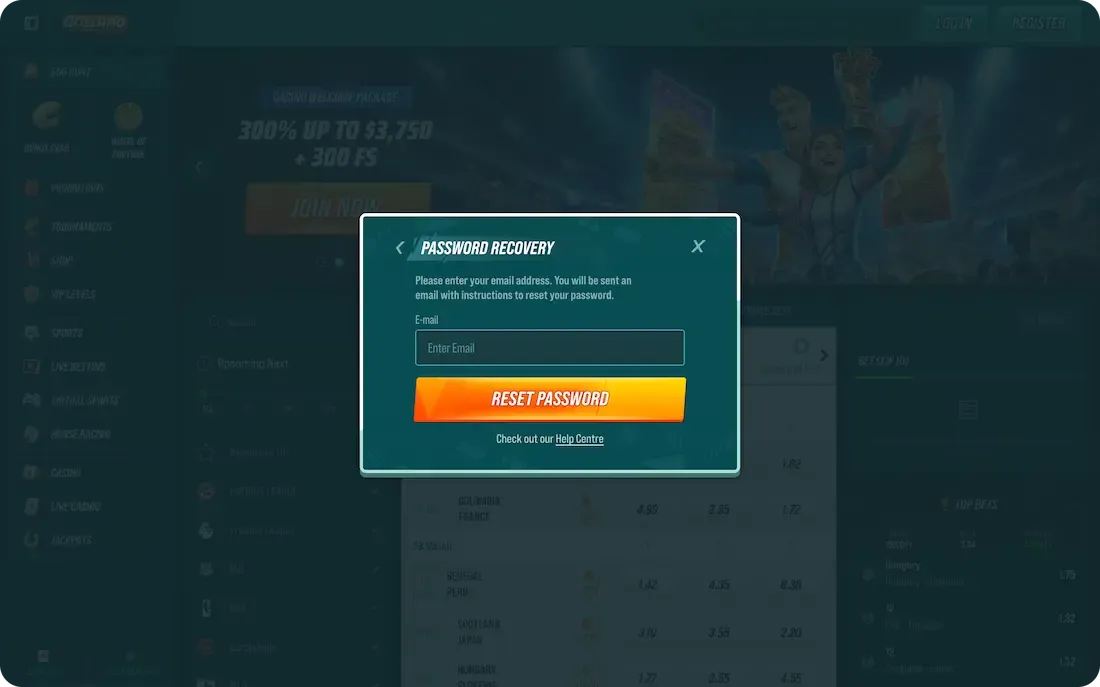
Forgetting a password on Golisimo can be frustrating, but the platform offers a streamlined recovery process to quickly restore access to your profile. Here is what to do:
- Click the "Login" button located at the top of the homepage.
- Tap the "Forgot Password?" link positioned near the credential entry fields.
- Enter the registered email address associated with your Golisimo account.
- Open the personal inbox for a password reset email from the system.
- Click the unique recovery link provided within the automated message.
- Input a new, secure password to update the login details.
- Use the new credentials to log in to the dashboard.
Login Data Security
Golisimo uses SSL/TLS encryption and 2FA to protect Canadian players' data and transactions.
Key Features:
- Fraud Monitoring. Scans for unusual betting or login patterns.
- KYC Compliance. Prevents identity theft through mandatory verification.
- Secure Payments. Uses PCI-compliant, tokenized financial gateways.
If you suspect a breach of your Golisimo account, change your password immediately and contact 24/7 Live Chat to freeze it.
Golisimo Account 2-Factor Authentication
Google Authenticator adds a vital security layer, protecting your account even if your password is stolen. Requiring a unique, time-sensitive code safeguards your personal data, funds, and "Energy" rewards. Download the app via the Apple App Store or Google Play Store.
Setup Guide:
- Install the Google Authenticator app on your smartphone or tablet.
- Access your Golisimo account with your usual credentials.
- Open "Account Settings" and find the "Security" tab.
- Select the 2-Factor Authentication (2FA) option.
- Use the app to scan the provided QR code.
- Enter the six-digit code shown in the app.
- Save your emergency recovery codes in a safe place.
Common Golisimo Login Issues & Solutions
Encountering login problems at Golisimo can be frustrating, but these issues are usually related to specific technical factors or simple credential errors. Most hurdles have straightforward solutions that let you resume playing and claim your Golisimo bonus without significant delay. By following basic troubleshooting steps, players can quickly resolve access barriers and secure their profiles. These are the most frequent problems and the corresponding actions required to fix them:
|
Problem |
Solution |
|
Internet Connection |
Switch between Wi-Fi and mobile data, or restart your router, to ensure a stable signal. |
|
Customer Support |
Contact the 24/7 Live chat team if your account appears locked or if you receive unknown error codes. |
|
Data Cleaning |
Clear your browser's history and cookies to remove old data that might cause login errors. |
|
Other Device |
Try accessing your account from a different smartphone or desktop to rule out hardware-specific glitches. |
|
Forgotten Password |
Use the "Forgot Password" link on the login screen to receive a secure reset email instantly. |
Accessing the Site if it is Blocked
While Golisimo is generally accessible in Canada, players may occasionally face connectivity issues due to local network restrictions or ISP filters. These blocks can be bypassed using specific technical adjustments or by seeking direct assistance from the platform’s technical team. To ensure uninterrupted access to your account and any active bonus, consider the following methods for overcoming a blocked connection:
- Use a VPN. A Virtual Private Network masks your IP address, allowing you to bypass local ISP filters. Using a paid service with a Canadian server ensures high speeds and maintains account compliance.
- Contact Customer Support. If the main domain is unreachable, email the support team to request a "mirror site" or an alternative official link. This ensures you are accessing a legitimate, secure version of the website.
How to Delete Your Account?
If you decide to stop playing at Golisimo, the platform offers a formal process to close your profile and remove personal data. This action is usually handled by the customer support team to ensure that all pending withdrawals are processed and that the player understands the finality of the request. Follow the standardized procedure outlined below to do it you have made your final decision to delete your account.
- Withdraw your cash balance by requesting a final withdrawal.
- Request a permanent account deletion via live chat or email.
- State clearly whether you want a standard closure or a responsible gambling self-exclusion option.
- Provide any requested identification details to confirm you are the authorized account owner.
- Acknowledge the final confirmation email sent by the support team to complete the process.
Disclaimer: Deleting your account is irreversible. Once finalized, you will lose access to all remaining funds, loyalty points, and active bonuses. These assets cannot be restored, and you may be restricted from opening a new account in the future.
FAQ
Can I update my account details at Golisimo?
Yes, you can update most personal details through the "Profile" or "Settings" section of your dashboard. However, for security reasons, certain sensitive information, like your registered name or currency, usually requires assistance from customer support to change.
How can I check if my Golisimo account is verified?
To check your status, navigate to the "Verification" tab in your account settings. If verified, you will see a confirmed status; otherwise, the platform will list the specific documents still required, such as ID or proof of address.
Can I access my Golisimo account from multiple devices?
Yes, Golisimo supports cross-platform access, allowing you to switch between desktop, tablet, and smartphone. For security, it is best to avoid simultaneous logins on multiple devices, as this may trigger automated fraud-prevention alerts or account locks.